


How to Reset or Change Your WEEX Password: Logged-In and Locked-Out Paths Explained
When people ask how to reset WEEX password credentials, they usually mean one of two situations: the account can still be opened and the password just needs changing, or the account cannot be opened at all because the password is forgotten. The two cases use different routes, and mixing them up is the main source of confusion.
The steps to reset WEEX password credentials are short in both cases, but a few details around them matter, such as which verification is needed and what happens to withdrawals afterward. Knowing which path applies makes it easier to reset WEEX password settings without losing time on the wrong screen.
Should You Reset or Change Your WEEX Password?
The choice depends on one question: can you still log in? If the account is open, the password is changed from Security settings, and the current password is required to make the change. If the password is forgotten and the account cannot be opened, it is reset by email from the login page, and no current password is needed.
Both routes end with a new password that should be strong, mixing letters, numbers and special characters, and different from passwords used on other sites. A routine change is also a sensible habit when a device has been lost or an unfamiliar login has been noticed. The next two sections cover the logged-in change on the website and in the app, and the section after that covers the reset for a locked-out account.
How Do You Change Your WEEX Password on the Website While Logged In?
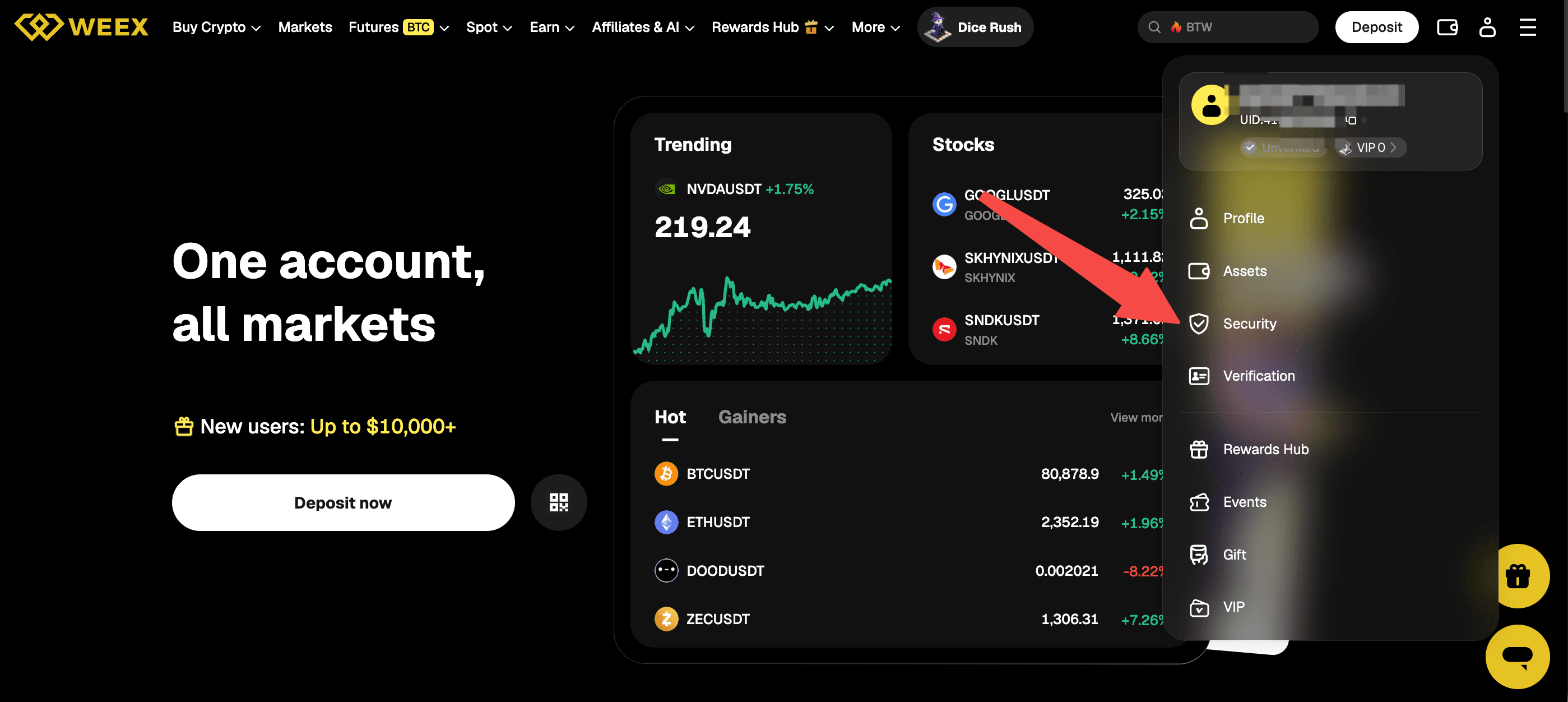
On the website, the change is made in Security settings. After logging in, click the account icon at the top right of the header, and the menu that opens lists Profile, Assets, Security and Verification, among other items. Click Security to open the Security settings page.
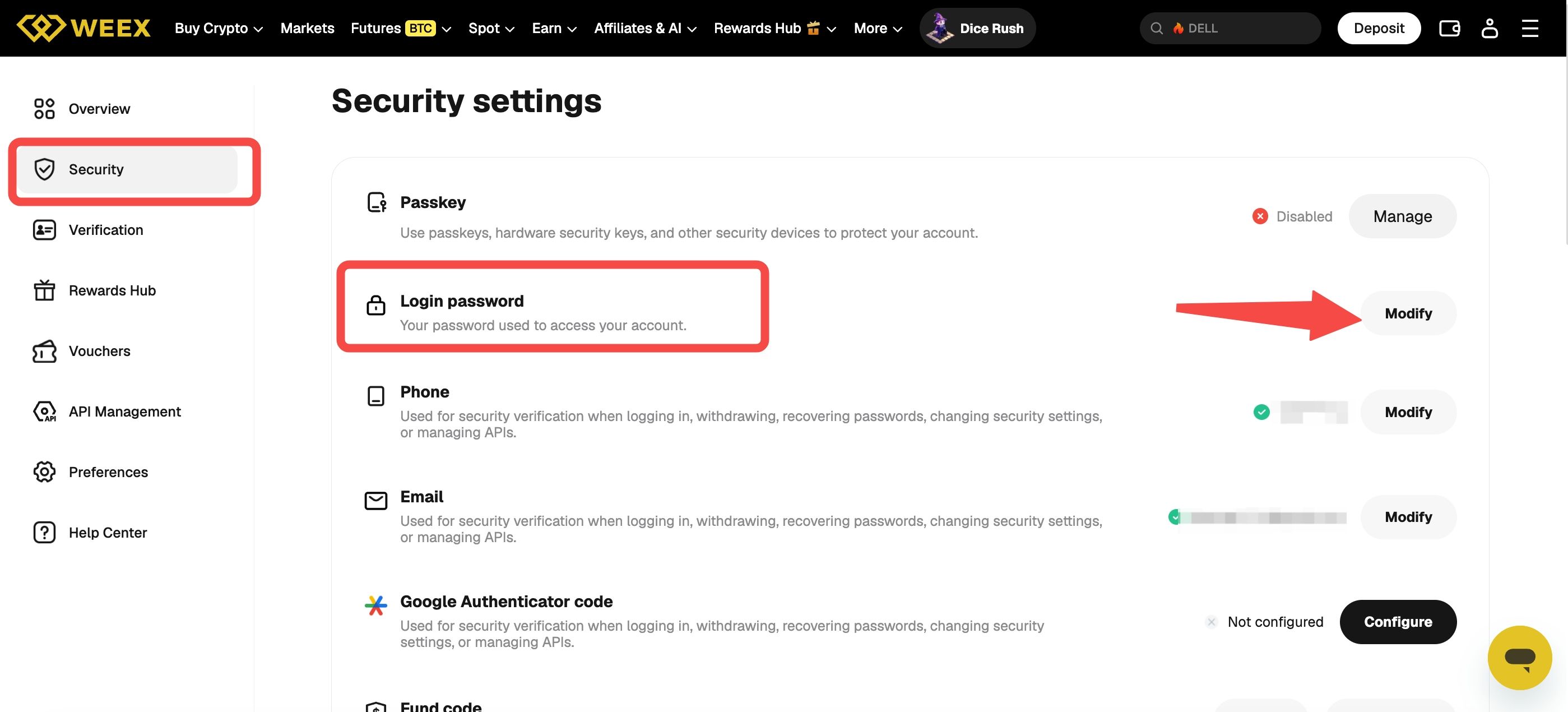
The Security settings page lists the available settings, including Passkey, Login password, Phone, Email and Google Authenticator code.
Next to Login password, click Modify, enter the current password when asked and follow the prompts to set the new one. The linked phone and email are used for security verification when logging in, withdrawing, recovering passwords and changing security settings, so a verification code may be requested during the change.
How Do You Change Your WEEX Password in the App?
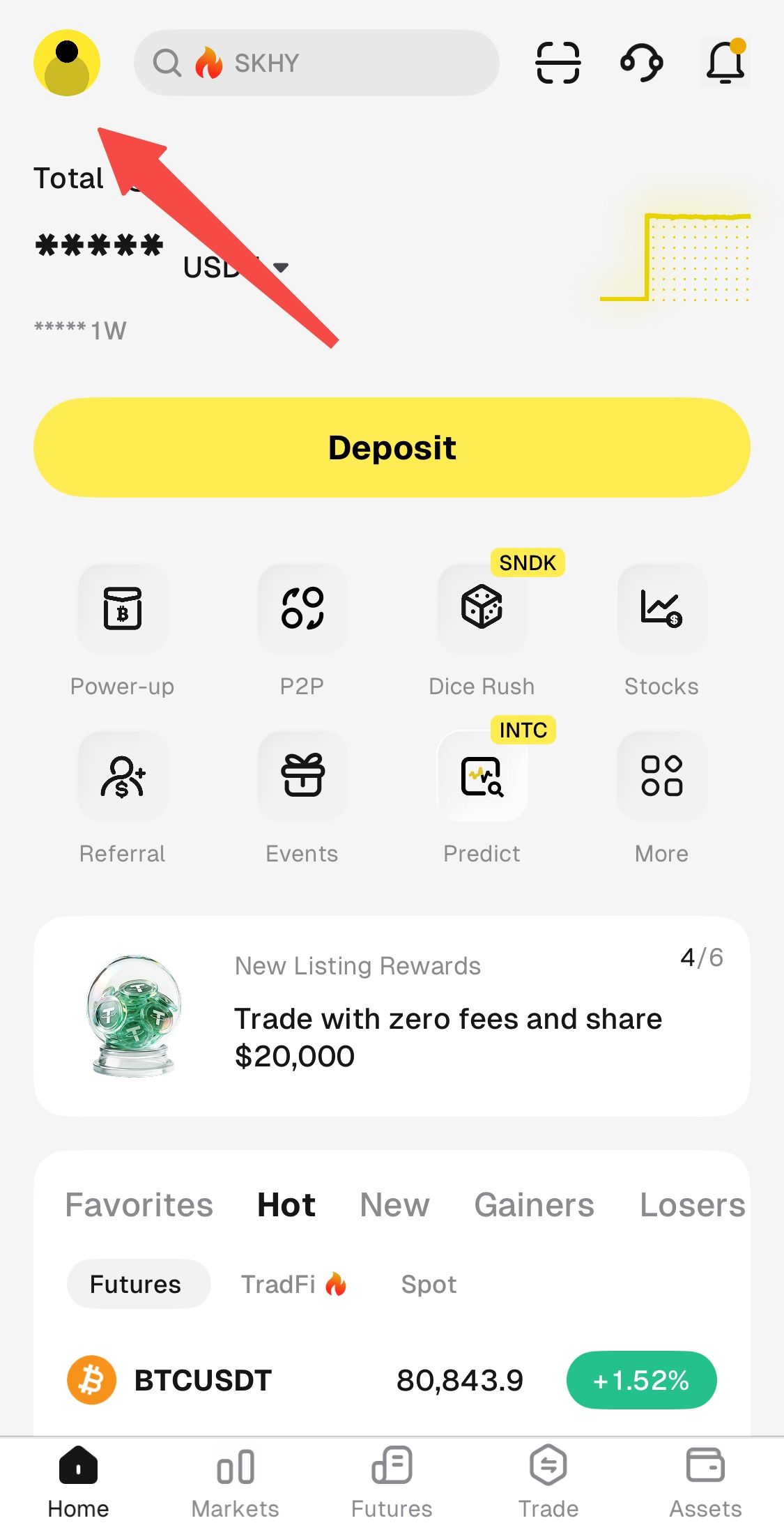
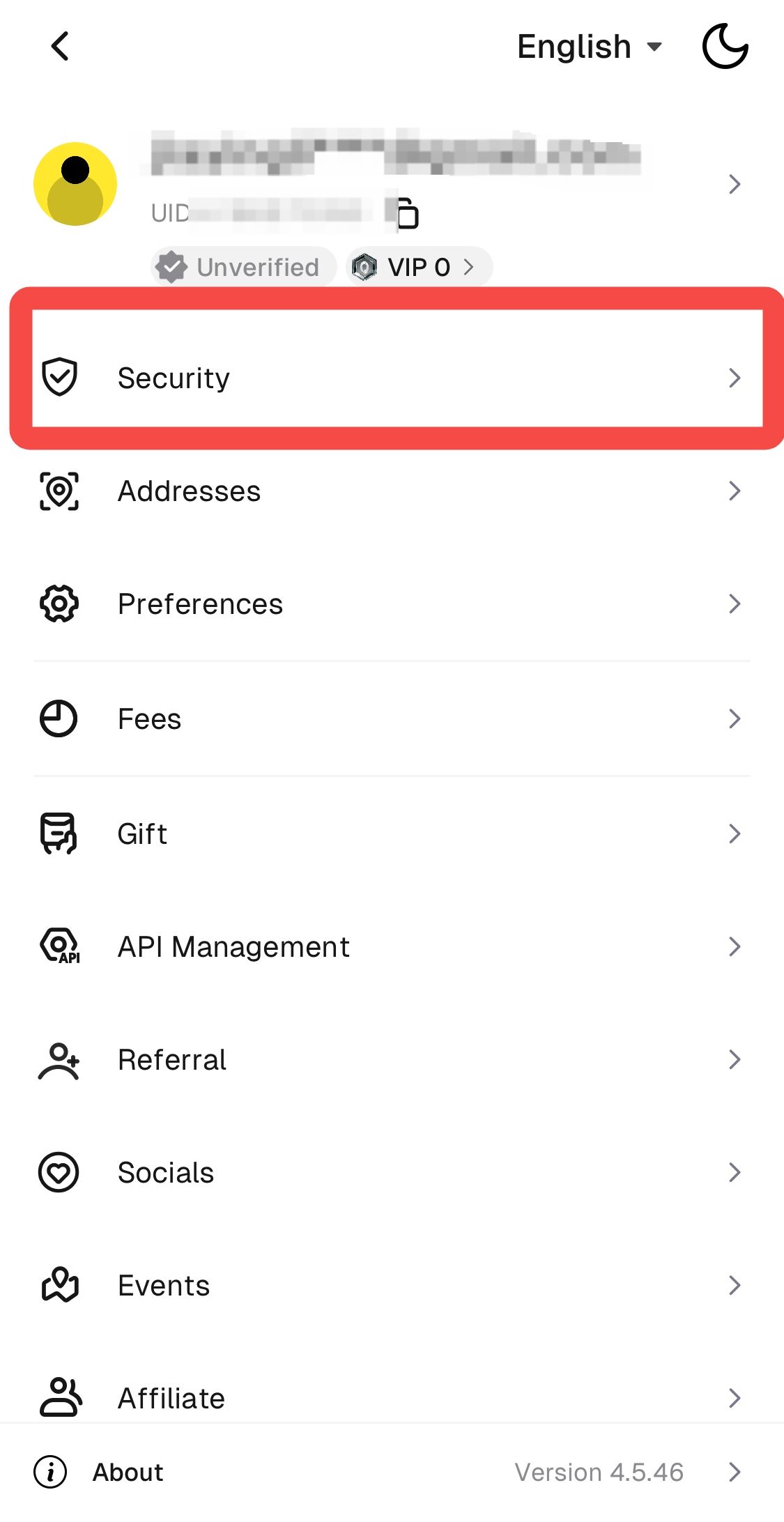
In the app, the change is also made in Security settings. On the Home screen, tap the avatar icon at the top left to open the account menu, which lists Security, Addresses, Preferences and other items, and tap Security.
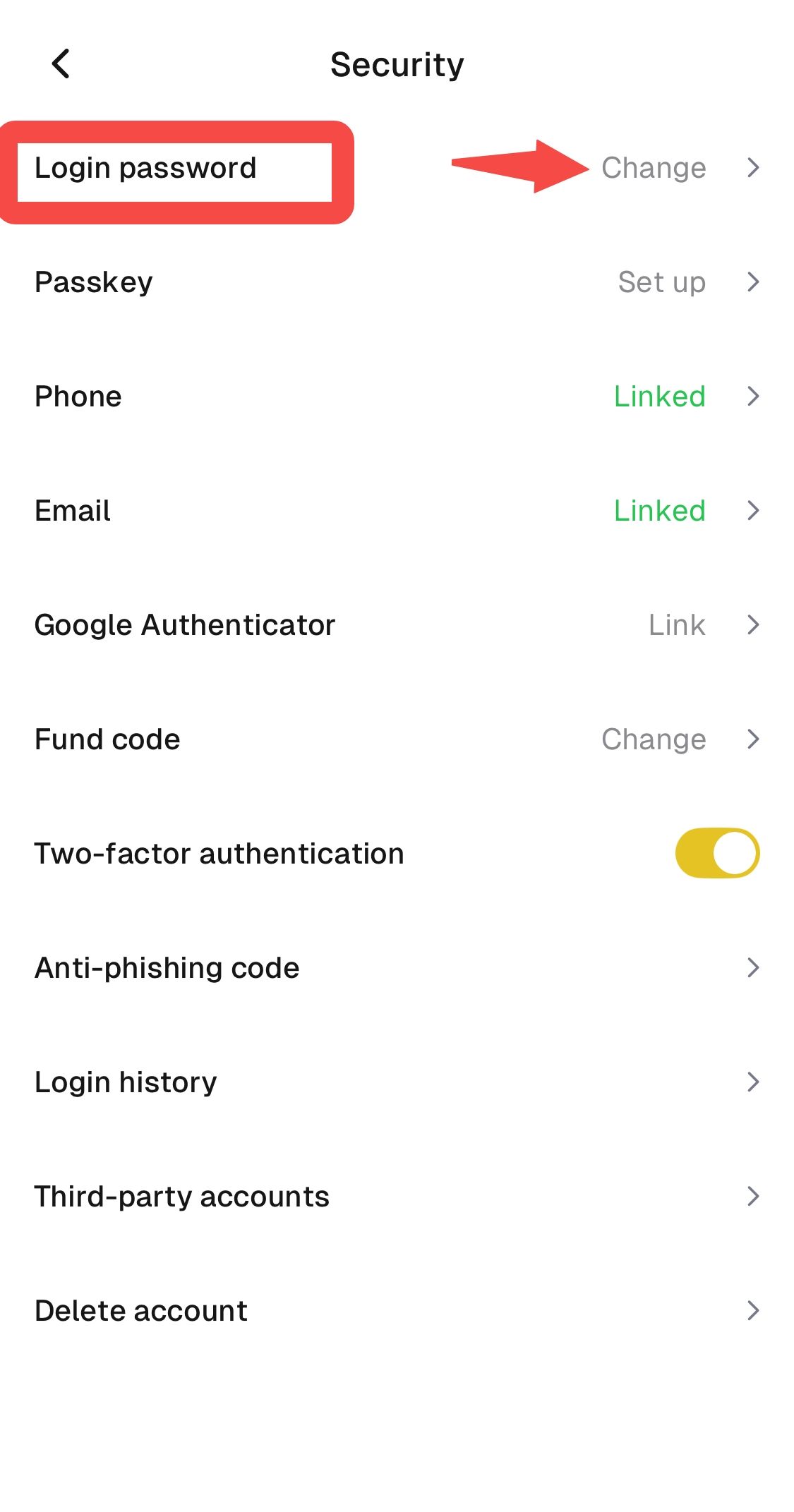
The Security page lists Login password, Passkey, Phone, Email, Google Authenticator, Fund code, Two-factor authentication, Anti-phishing code, Login history, Third-party accounts and Delete account.
Tap Change next to Login password, enter the current password when asked and follow the prompts to set the new one. The same page also shows the Two-factor authentication setting, which adds a mobile-generated code requirement and is worth keeping on. The menu layout can change between app versions, so the labels on screen are the ones to follow.
How Do You Reset a Forgotten WEEX Password When You Cannot Log In?
A forgotten password is reset by email from the login page, and WEEX’s guide to resetting a password or recovering an account walks through the website flow. On the official site, click Login, then click Forgot Password below the login fields and enter the account email, checking that it is typed correctly. WEEX sends a reset email, so the inbox should be checked, along with the spam or junk folder, and the link in the email opens the page for a new password, which is entered twice to confirm. After signing in with the new password, turning on two-factor authentication adds an extra layer of protection.
The reset depends on access to the registered email, so keeping that email secure matters. If the reset email does not arrive, the checks in WEEX’s guide to what to do when a verification code is not received apply. An account locked after multiple incorrect password attempts is handled by customer service, which asks for one of the UID, the phone number or the email, together with a photo of the ID card with a handwritten note. That material should only be sent through WEEX’s official customer service channels.
What Should You Expect After Changing the Password, and Where Can You Ask for Help?
After a password change, withdrawals may be locked for 24 hours. A recent password change or a login from a new device can trigger the lock, so any withdrawal that is time-sensitive should be planned around it. Checking Login history in the Security settings after the change shows where the account has been accessed, and an unfamiliar device is a reason to contact customer service immediately.
In the WEEX app, the customer service entry is the headset icon at the top right of the Home screen, next to the scan and notification icons. On the WEEX website, the footer has a Support section, and under Contact Us there is a Customer Support Bot link, and there is also a chat button at the bottom right corner of the page. When writing in, give one of the UID, the phone number or the email address, and describe what happens and what has been tried. A password or a verification code should never be shared with anyone, and WEEX official channel admins will never contact users privately to request personal, financial or account information.
Conclusion
Changing or resetting a WEEX password depends on whether the account can be opened. A logged-in user opens Security settings, selects the Login password option and enters the current password, on the website with Modify and in the app with Change. A locked-out user resets the password by email from the Forgot Password link on the login page.
After the change, withdrawals may be locked for 24 hours, so timing matters. Keep two-factor authentication on, check Login history when something looks unfamiliar, and use customer service for anything that self-service cannot fix, keeping the password and every verification code private.
FAQ
1. How do I change my WEEX password while logged in?
Open Security settings and select the Login password option, which is Modify on the website and Change in the app. The current password is required.
2. How do I reset WEEX password credentials if I forgot them?
On the official website, click Login and then Forgot Password, enter the account email and follow the link in the reset email. Check the spam folder if the email does not arrive.
3. Where do I find the password setting in the WEEX app?
Tap the avatar icon at the top left of the Home screen, tap Security and then tap Change next to Login password.
4. Are withdrawals affected after I change my password?
A recent password change may lock withdrawals for 24 hours. Plan any time-sensitive withdrawal around that.
5. What if my WEEX account is locked after wrong passwords?
Contact customer service and provide the UID, phone number or email. An ID photo with a handwritten note may be needed, and it should only be sent through official WEEX channels.

Gainers


