


Why Did My WEEX Withdrawal Fail or Get Rejected? How to Fix It
Why Did My WEEX Withdrawal Fail or Get Rejected? How to Fix It
If a WEEX withdrawal fails or is rejected, first read the exact message and status in Withdrawal History. Then check your available balance, the selected asset and network, destination address, withdrawal amount, and any required security verification. A failed request is different from a pending withdrawal or a transaction already broadcast to the blockchain. Fix only the issue identified, then confirm the first request’s status before submitting another one.
The error message is the best starting point. “Insufficient balance,” “below minimum,” “verification failed,” and “withdrawal unavailable” point to different actions. If the message is unclear, save a screenshot and contact WEEX support with the withdrawal record rather than repeatedly changing the amount or address.
Where Can I See Why My WEEX Withdrawal Failed?
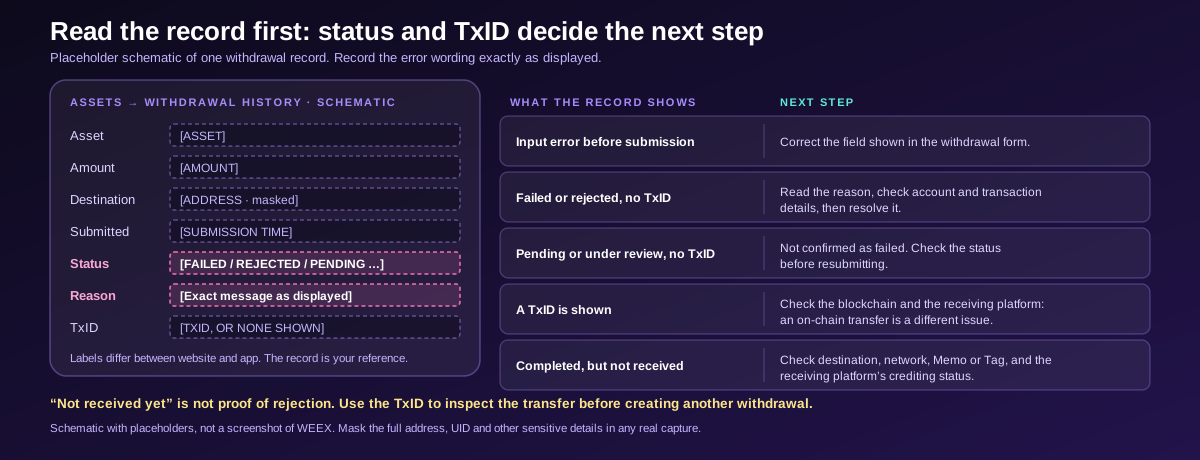
Log in to WEEX and open Assets → Withdrawal History. Find the request by its asset, amount, destination, and submission time. Check whether it is marked failed, rejected, pending, processing, or completed. If an error or rejection reason is displayed, record its exact wording.
The WEEX withdrawal FAQ describes how to find withdrawal records and notes that support can check a request when you provide your account identifier. Interface labels may differ between the website and app, so use the withdrawal record itself as your reference.
Before taking action, establish whether the request reached the blockchain:
| What the Record Shows | What It Means for Your Next Step |
|---|---|
| An input error before submission | Correct the field shown in the withdrawal form |
| Failed or rejected, with no TxID | Read the reason, check the account and transaction details, then resolve the issue |
| Pending or under review, with no TxID | The request has not been confirmed as failed; check its status before resubmitting |
| A TxID or transaction hash | Check the blockchain and receiving platform; a submitted on-chain transfer is a different issue |
| Completed on WEEX, but not received | Investigate the destination, network, Memo or Tag, and receiving platform’s crediting status |
Do not treat “not received yet” as proof that a withdrawal was rejected. If WEEX provides a TxID, use it to inspect the on-chain transfer before trying to create another withdrawal.
What Should I Check If WEEX Says “Insufficient Balance”?
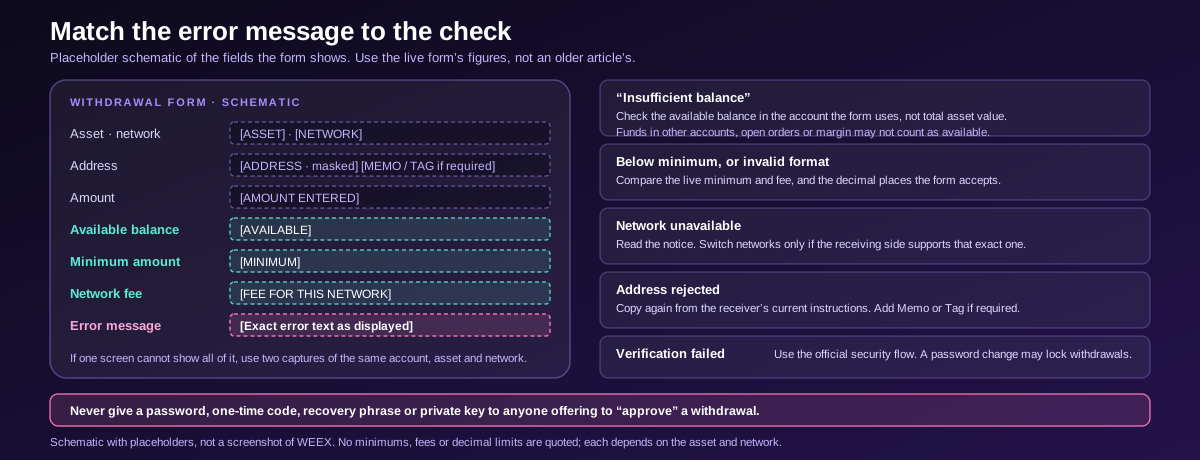
Check the available balance of the asset you are trying to withdraw, not just your account’s total asset value. A total balance can include funds held in another account, assets committed to open orders, or funds used as margin. Those amounts may not be available for the requested withdrawal.
The WEEX asset balance guide explains where to inspect balances across Funding, Spot, Futures, and other account sections. Open the relevant asset and compare its available amount with the amount entered in the withdrawal form. Also check how the selected network’s fee is displayed and whether your available funds cover the amount required by the form.
For example, holding assets in a Futures account does not establish that the same amount is available in the account used for an on-chain withdrawal. If the interface indicates that a transfer between your WEEX accounts is needed, review the account and transfer details before retrying. Similarly, an unfilled Spot order can lock part of an asset balance until the order is completed or canceled.
Do not cancel an order or change a position solely because a withdrawal failed without first checking what funds are committed and what effect that action would have. The practical goal is to identify the available amount the withdrawal form can use.
Could the Amount or Network Cause a Withdrawal Rejection?
Yes. Withdrawal requirements depend on the selected asset and network. Check the minimum amount and fee displayed in the live withdrawal form. An amount below the minimum, an amount your available balance cannot cover, or an unavailable network can prevent a request from proceeding.
WEEX’s deposit and withdrawal guide walks through selecting the asset and network, entering the amount, and reviewing the fee before confirming. Use the form’s current figures rather than an amount copied from an older article.
If the error concerns amount precision or an invalid format, re-enter the amount using the number of decimal places the form accepts. An older WEEX FAQ describes a six-decimal-place limit in one withdrawal scenario, but that should not be applied blindly to every current asset and withdrawal route. Follow the error shown for your request and ask support if it persists.
If the chosen network is temporarily unavailable, check the notice shown in the withdrawal interface and any relevant official announcement. You can use another network only when the receiving wallet or platform supports that exact asset and network. A cheaper or currently available route is useful only if the destination can receive it.
What If WEEX Rejects the Withdrawal Address?
Check the destination against the receiving wallet or exchange’s current deposit instructions. Copy the address directly, verify the asset and network, and include a Memo or Tag when the receiving platform requires one. Do not substitute an address generated for a different network.
A rejected or invalid-address message may be resolved by correcting the entry, but the precise cause depends on the form and the destination. Check for missing characters, extra spaces, or an address copied from an outdated saved entry. Review the full destination information on the confirmation screen before submitting.
Some withdrawals or address changes may also require additional checks. WEEX’s withdrawal security notice says identity or wallet-address confirmation may be required in certain circumstances, including large withdrawals and address changes. If the interface asks for verification or tells you to contact support, complete that process through the official WEEX website or app.
An address-format rejection before broadcast differs from a withdrawal already sent to the wrong address. Once a blockchain transfer has been broadcast, editing the address in a new form will not change the earlier transaction.
What Should I Do If Security Verification Fails?
Return to the withdrawal record or form and identify the specific verification step that failed. WEEX may ask you to confirm a withdrawal using the security method enabled on your account. Enter the current code or complete the prompt presented through the official WEEX interface; expired or incorrect verification attempts need to be resolved before retrying.
WEEX has also introduced Passkey verification for withdrawals. Its availability depends on your account setup and the operation shown in the interface. If you use a Passkey, complete the prompt on your trusted device rather than sharing credentials with anyone.
A recent change to your account’s security settings may trigger a temporary withdrawal restriction. For example, WEEX’s password-change guidance says withdrawals may be locked for 24 hours after a password change. Read the restriction message and countdown displayed for your account; do not assume every rejection has the same duration or cause.
Never provide a password, one-time verification code, recovery phrase, or private key to someone offering to “approve” a withdrawal.
Can KYC or an Account Restriction Prevent a Withdrawal?
A withdrawal may require identity checks or be subject to an account-specific restriction. If the message mentions verification, limits, or a review, read the instructions displayed for your account and complete any requested steps through official WEEX channels.
The WEEX KYC requirements article explains that verification requirements can differ by service and account circumstances. This is why a general statement such as “all withdrawals require the same KYC level” may not describe your case accurately.
If a verification submission was rejected, review the reason before trying again. If the withdrawal itself is marked under review, wait for the record to update or ask support to check it; “under review” is not the same as “rejected.” A platform-wide withdrawal pause for an asset or network is also different from a restriction shown only on your account.
When contacting support, quote the exact message and say where you saw it. That helps distinguish a security hold, an identity check, and a service-status issue.
What If the Withdrawal Is Pending Rather Than Failed?
Check whether the withdrawal record has a TxID. A pending request without a TxID may still be undergoing WEEX processing or security review. A request with a TxID has progressed to an on-chain transfer that you can inspect on a blockchain explorer.
Use the WEEX withdrawal timing guide when the status is pending and there is no explicit failure message. Review the current account notice and transaction status before submitting again. A second request does not necessarily replace or cancel the first.
If the record says the withdrawal was completed but the receiving account has no credit, check the TxID, destination address, network, and any required Memo or Tag. The receiving platform may have its own confirmation and crediting process. Explain the distinction when you seek help: “failed before broadcast” and “sent on-chain but not credited at the destination” require different investigations.
When Should I Contact WEEX Support?
Contact WEEX support if the error remains after you check the available balance, minimum, network, destination, and verification requirements; if the reason for rejection is unclear; or if an account restriction requires review.
Prepare:
- Your WEEX UID or another account identifier requested in the official support flow.
- The asset, network, withdrawal amount, and approximate submission time.
- The withdrawal record or order ID, if displayed.
- The exact error message or rejection reason.
- A screenshot of the status with sensitive details concealed.
- The TxID, if one exists.
A clear request might read: “My withdrawal of [asset] on [network] at [time] shows ‘[exact status/error]’ in Withdrawal History. My available balance is [amount], and the withdrawal record is [ID if shown]. Please check why the request was rejected and what I need to complete.”
Do not send repeated withdrawal requests while an earlier one still appears pending. First confirm whether it failed, remains in review, or has been broadcast.
WEEX Editorial View: Let the Status Determine the Fix
The most effective way to resolve a failed withdrawal is to match the action to the status. An amount error calls for checking the available balance and live minimum. An address error calls for comparing the receiving platform’s current instructions. A verification or restriction message calls for the account’s official security flow. A pending request or an existing TxID calls for tracking the original transaction before making another one. Keep the withdrawal record and exact error text so WEEX support can review the right request.
FAQ
1. Why Does WEEX Say I Have Insufficient Balance When I Can See Assets?
Your total asset value may include funds in another account or amounts committed to orders or margin. Check the available balance for the asset in the account used by the withdrawal form, along with the amount and fee shown for the chosen network.
2. Can I Retry a Rejected WEEX Withdrawal Immediately?
First identify why it was rejected and confirm the original request is no longer pending or processing. Correct the relevant issue before submitting a new request. A security restriction may require you to wait or complete an additional verification step.
3. Does “Pending” Mean My WEEX Withdrawal Failed?
No. Pending indicates the request has not reached a final status. Check Withdrawal History for updates and whether a TxID has been issued before taking further action.
4. What If My WEEX Withdrawal Fails After I Change My Password?
Read the security restriction shown in your account. A recent password change may temporarily lock withdrawals. If the restriction does not match the message or does not clear as indicated, contact official support with the exact error.
5. How Do I Know Whether WEEX Sent a Rejected Withdrawal On-Chain?
Check Withdrawal History for a TxID. If no TxID is shown and the request is marked failed or rejected, provide the record to support if the reason is unclear. If a TxID exists, inspect the blockchain transfer and the receiving platform’s deposit status.
Recommended Articles
- WEEX Withdrawal Pending? What Actually Delays a Transfer
- How to Spot a Fake WEEX: Verify Any Contact in 30 Seconds
Meta Title: WEEX Withdrawal Failed or Rejected? Causes and Fixes
Meta Description: Find out why a WEEX withdrawal failed or was rejected. Check balance, address, network, verification, and status before you retry.

Gainers


